Next: GEOMETRY LINE CIRCLE pnam radius [plane] Up: GEOMETRY LINE Control Previous: GEOMETRY LINE ANGLE [new_l] old_l angle
Next: GEOMETRY LINE CIRCLE pnam radius [plane]
Up: GEOMETRY LINE Control
Previous: GEOMETRY LINE ANGLE [new_l] old_l angle
This command is used to define an arc of less than 180 degrees via three points
or an ellipse via four points.
| lnam | = | name of the line, used for later references to the line. |
| pstart | = | name of a point which defines the start point of the arc. |
| pend | = | name of a point which defines the end point of the arc. |
| pcentre | = | name of a point which is the centre of the arc. |
| paxis | = | name of the point which defines one axis of an ellipse. This point can be one |
| of the end points of the ellipse. Generally the shortest part of an ellipse will | ||
| be created; however, in situations where neither end point lies along the axis | ||
| defined by 'pcentre' to 'paxis', the direction of the axis can be used to control | ||
| which part of the ellipse is created. In order to achieve this, the axis (or an | ||
| extension of the axis) should intersect the projected arc. This is illustrated in | ||
| the examples below. In general, the segment of the ellipse that is defined may | ||
| be toggled by reversing the direction of the axis. | ||
| divn | = | integer which specifies how many nodes are to be placed along the line. If |
| omitted a default of four divisions (ie Five nodes) is assumed. The default | ||
| number of divisions can be reset using the command | ||
| MESHING DIVISION DEFAULT. |
Notes:
Return Level: GEOMETRY LINE
Examples:
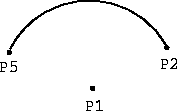
Defines a line named C1 from P1 to P2 with centre P3.
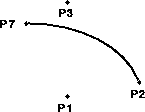
Defines an ellipse named ELL1 from P2 to P7 with a centre at P1 and
one of the axes defined by P3.
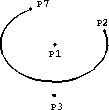
Defines an ellipse named ELL2 from P2 to P7 with a centre at P1 and
one of the axes defined by P3.
See also the following commands
'LABEL GEOMETRY LINES'
'UTILITY DELETE LINES'
'UTILITY TABULATE GEOMETRY LINES'
'VIEW GEOMETRY'
Femsys Limited