If you are visiting the OTA Legacy website and using a frames-capable browser, you've may have noticed the three panels or frames within your browser window. You are actually looking at three separate web pages simultaneousl
 t
tHowever, if you are using an early frames-capable browser, such as Netscape Navigator v2.0, you may find that the "Back" button work a little differently than you may expect because it takes you back to the last time that the entire 3-frame screen was refreshed. If you simply want to revisit a previously chosen frame, you'll find yourself further back than you meant to be.
More recent versions of Netscape Navigator (3.0 and later), Microsoft Internet Explorer, and most other browsers don't have this odd behavior, so you may wish to update your browser. If you wish to stay with the older browser, though, you'll want to know the following trick:
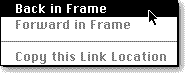 If you're using a Macintosh, you can go back one frame by positioning your mouse inside the frame that originally displayed the information you're seeking and holding down the mouse button. A pop-up menu will appear. Select "Back in Frame" and the frame will fill with the information that last appeared in that frame. Windows and Unix users can click the right mouse button to make the pop-up menu appear. Try it now to return to the frame you were viewing before this one.
