Next: Data Set Header and Up: Format of the neutral Previous: Format of the neutral
Next: Data Set Header and
Up: Format of the neutral
Previous: Format of the neutral
The user will generally begin with finite element model data generated by FEMGEN , or with an output file from a Finite Element analysis package. If the data is coming from an analysis package then firstly, an interface (or translator) program is used to read data from this analysis output file, translate it and write it out to a neutral file in the format required for input to FEMVIEW..
Interface programs to most of the popular Finite Element codes are available, and these generally allow the user to control the type or types of results that they wish to transfer to the FEMVIEW database.
This appendix is provided to enable users to write their own interface programs. It explains, in detail, the syntactic and semantic conventions of the neutral file for input to the FEMVIEW program. Some simple example models are provided to illustrate these conventions.
The Fortran computer language's format statement is used to specify the format of the input.
(Note that in addition to the neutral file , a set of Fortran callable User Routines is also supported. The use of these enables data to be written directly into the FEMVIEW.database without recourse to the neutral file. Details of these User Routines are given in a separate manual.)
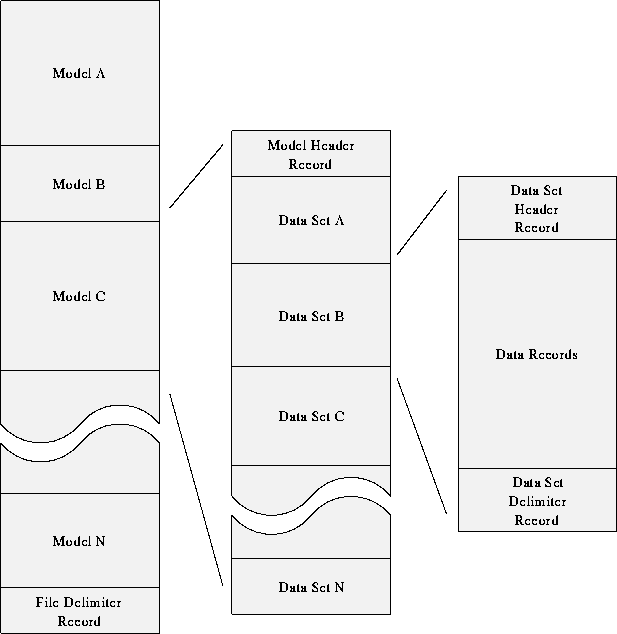
Each model is preceded by a model header record. Each model is delimited by the next model header record, the next user or project header record, or the file delimiter record. Within each model, a number of data sets will be present (e.g. nodal coordinates or results).
Each data set is preceded by a data set header and delimited by a data set delimiter. Additional headers may follow the data set header for some types of data set where additional information is required (e.g. User-Defined Results).
| Local | systems that are local to a particular element, node or gauss point. |
| Model Global | a system that is global to a particular model (net/superelement). |
| Assembly Global | the system into which models (nets/superelements) are assembled. |
| Reference | an arbitary system. |
The system indicator (SYSID) on each coordinate Header Record is used to specify the identifier of the local system used for constraints or DOFs at a node. This enables constraints to be displayed in local systems and displacement magnitudes to be displayed with reference to the local system.
The system indicator (ISYSTM) on the Entity Header Record is set=-1 if the results are given in a local system, or set=0 if given in the model global system. (A future development will allow the system indicator to be specified in the Data Set Header Record to define a default for the data set).
Use of the results local systems will depend on the presentation mode. Where the direction of the results is important, for example vector plots of principal stresses; then if results are in a local system the Results Local System will be used to transform the results from local to model global before the principal stress calculations are performed. Where magnitudes are being presented then the default will be that the results are presented without transformation. However, transformation from local to model global may be requested by the commands RESULTS TRANSFORM GLOBAL.
Note that the Results Local Systems are defined at the model level and thus apply to all results. A future development would be to allow Results Local Systems to be specified at the loadcase level also, so that systems could be redefined for example during a large displacement analysis. The rule would then be that the loadcase level systems would be applied where they existed rather than the model level systems.
Another future requirement will be to include Results Local Systems for nodal materially independent results and for element invariant results.
The local system identifier (SYSID) on each Element Definition Header Record (Data Set 3) will be used to identify the reference system for a particular element. A command will be necessary to request use of these reference systems and also it would be useful if reference systems could be attached to elements (sets?) interactively.
Femsys Limited