HOME| TEXT| GRADING | STAFF | DEMOS | LECTURES | LABS| ELECTRONICS| PROGRAMS
(Laying out the board)
 |
Now you will create the board outline. The things you need to consider are the following:
| ||||||||
|
Select the Obstacle button from the tool bar
| ||||||||
|
Select the Global Layer from the layer pull down list
| ||||||||
|
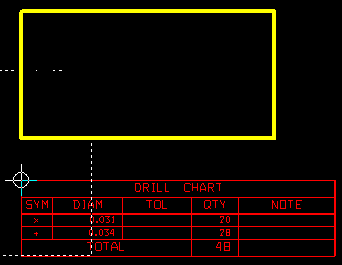
I usually place the board above the drill chart. Click on the workspace for the lower left corner, then move up click, move right click, move down click then press ESC. A yellow box should trace out. Use the X Y coordinates in the upper left to determine your outline size as you trace. Remember, I'm using mils or 1000th of an inch. My example is 2" x 3". |
|
Click on DRC |
|
The datum |
|
Select the component button from the tool bar
|
|
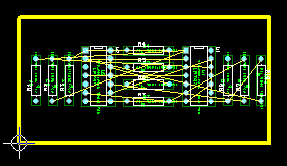
Start moving components to within the yellow outline. |
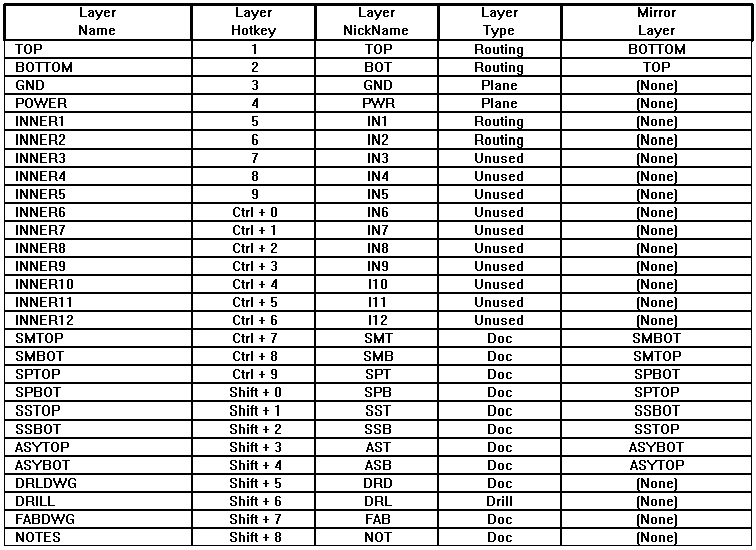
| The board we are building only has a top and bottom (no inner layers), so go to Tool -> Layer -> Select from a spreadsheet ... |
|
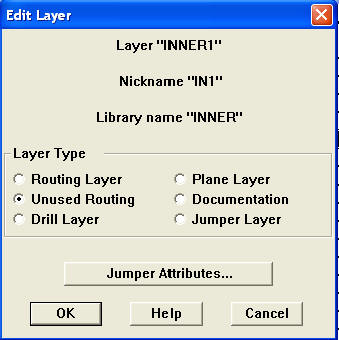
Select a Layer and from a right click choose "Properties" to edit the layer. Change the GND, POWER and any INNER layer to say Unused. |
|
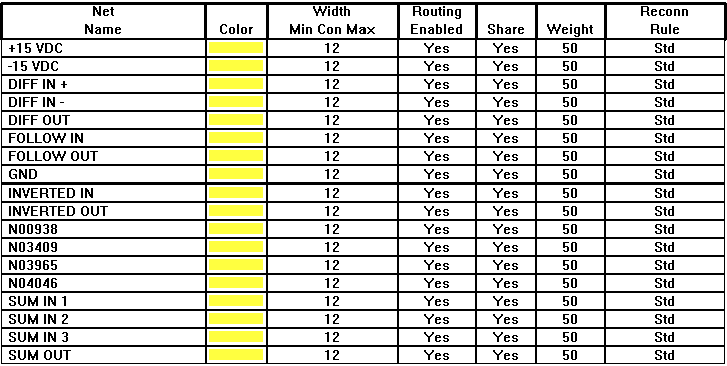
Let's take a second to look at the nets.
|
Last Modified:
10/04/04
MAE433
WEBMASTER

 .
. .
. so that it's gray. The
Design Rule Checker feature gets in the way at the beginning of the process.
The dotted line should disappear.
so that it's gray. The
Design Rule Checker feature gets in the way at the beginning of the process.
The dotted line should disappear.  is the reference place for the
coordinate system. The datum represents 0,0. I prefer that the lower
left corner of the board be 0,0. Go to Tool -> Dimension -> Move Datum.
Click on the lower left corner to move the datum.
is the reference place for the
coordinate system. The datum represents 0,0. I prefer that the lower
left corner of the board be 0,0. Go to Tool -> Dimension -> Move Datum.
Click on the lower left corner to move the datum. and "TOP" for the layer
 .
.